Without a shared plan
The scramble
- 3:42Three text threads about Friday pickup
- 4:10A receipt buried in email
- 4:58Two calendars that do not match
CoParent
Share custody, handoffs, messages, and costs — so your child has continuity. Built for the Friday scramble, not another social feed.
The Friday problem
CoParent is for the week that keeps slipping between text threads — so handoffs, costs, and school details stop living in three different places.
Without a shared plan
With CoParent
Same Friday. Same handoff. Zero chase.
How it works
CoParent is built for two households — start alone if you need to, then unlock full coordination the moment both parents are linked.
Start
One parent opens the household in under a minute. Your schedule can begin right away — even before the other parent joins.
Invite
Share a short invite code. They join with equal access — no admin hierarchy, no one-sided control.
Plan
Add custody patterns, handoffs, and exceptions so both homes work from the same source of truth.
Coordinate
Once both parents are connected, shared messaging, expenses, and files unlock so logistics stay in one calm place.
Features
Built for real co-parenting logistics — shared schedules, calm messages, clear costs, and the files that matter. Not another social feed.
One schedule both parents see — handoffs, exceptions, and the week ahead. Always available, even before Plus.
Allergies, routines, school details, and emergency contacts both households can trust when plans change.
Keep school updates and logistics in one thread. Optional tone check offers a clearer rewrite when it matters.
Log shared costs, request reimbursement, and settle balances — with receipts when you need a paper trail.
School, medical, and legal files in one place. Pin what matters and request what’s still missing.
Stay informed about calendar changes, messages, and expenses without living in the app all day.
Calendar stays free. Coordinating Plus unlocks messaging, expenses, and documents for both parents.
See it clearly
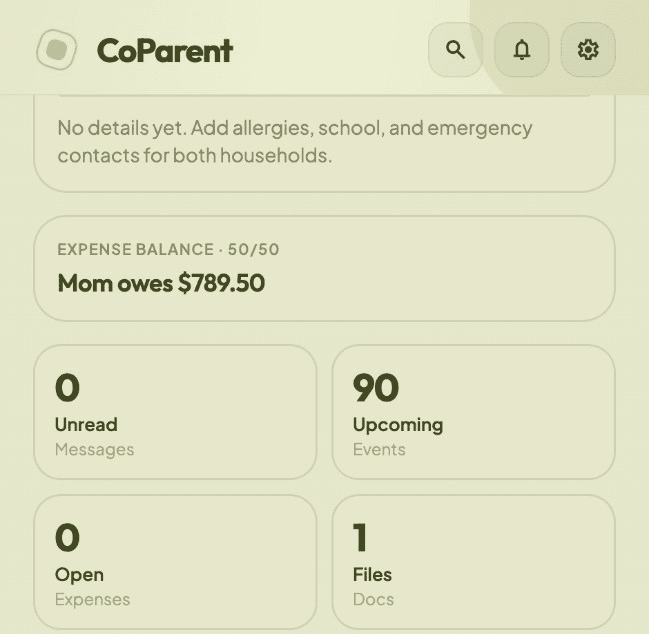
Not a feed. A shared operating system for two households: what happens this week, what was said, and what still needs settling.
Why people download
CoParent is shaped by the logistics that keep colliding — not by social feeds or points systems. Real reviews will live here when the stores go live.
01One place
I just needed one place that was not WhatsApp — where the school email, the pickup change, and who paid for soccer actually lived together.
02Equal trust
Equal access matters. If only one parent “owns” the app, the other parent will never trust it.
03Small logistics
The Friday scramble is what breaks us. Not the big stuff — the small logistics that keep colliding.
What stays true in CoParent
Pricing
Calendar stays free. Coordinating Plus unlocks messaging, expenses, and documents for both linked parents — one family subscription.
Free
$0forever
Start coordinating the week without a subscription.
Most families
Coordinating Plus
In-appprice at checkout
Unlocks full coordination for both linked parents together.
Billed via App Store or Google Play. One subscription unlocks both parents. Cancel anytime.
Equal access — whichever parent pays.
Built for two households
CoParent is a neutral coordination tool — calm, private, and equal for both parents. Designed for logistics under stress, not performance or points.
Both linked parents see the same calendar, balances, and files — identical permissions, no one-sided control.
A short invite code keeps the family closed. Only the two parents you link can open shared history.
Handoffs, expenses, and documents live in one place so you are not reconciling two versions of the week.
Leave a family or delete your account in Settings when you need to. Shared history stays with the remaining parent where required.
FAQ
Straight answers about pending families, Plus, privacy, and leaving cleanly — so you know what you’re signing up for.
Read the Privacy Policy and Terms of Use before creating an account. Need help? support@withcoparent.com
A family stays pending until the second parent joins with an invite code. Shared messaging, expenses, and documents wait until then so both households stay in sync from the first shared day.
Plus unlocks messaging, expenses, documents, tone check, and court export for both parents. The shared custody calendar stays free so the schedule is always available — even before you upgrade.
Coordinating Plus is billed through the App Store or Google Play. The exact price is shown in-app at checkout and can vary by region. One subscription unlocks Plus for both linked parents.
Coordinating Plus is shared at the family level once active. Both linked parents get the unlocked features together so access stays equal.
CoParent is built for iPhone and Android. Download from the App Store or Google Play using the buttons on this page.
Only the parents linked to your family. Invite codes keep the household private. We do not sell personal information or run ads against your family data.
Yes. You can leave a family or permanently delete your account from Settings. Deleting signs you out and removes your login; shared history stays with the remaining parent labeled as a deleted account where needed.
Email support@withcoparent.com. For privacy questions, use privacy@withcoparent.com. We aim to respond within a few business days.
No. CoParent is a coordination tool for logistics between two households. Follow your court orders and local laws. In an emergency, contact local authorities.
Download
Shared custody, calm messaging, expenses, and documents — one clear plan across both homes. Available for iPhone and Android.
Questions before you install? support@withcoparent.com